AI-powered business intelligence

Dashboards you control. Answers your team can use.

Dashboards you control. Answers your team can use.

Turn your spreadsheets into interactive dashboards you can edit. Give your team one secure place to use them—and ask business questions in Timeliq, WhatsApp or Slack.

Turn your spreadsheets into interactive dashboards you can edit. Give your team one secure place to use them—and ask business questions in Timeliq, WhatsApp or Slack.

Create it. Refine it. Keep using it.

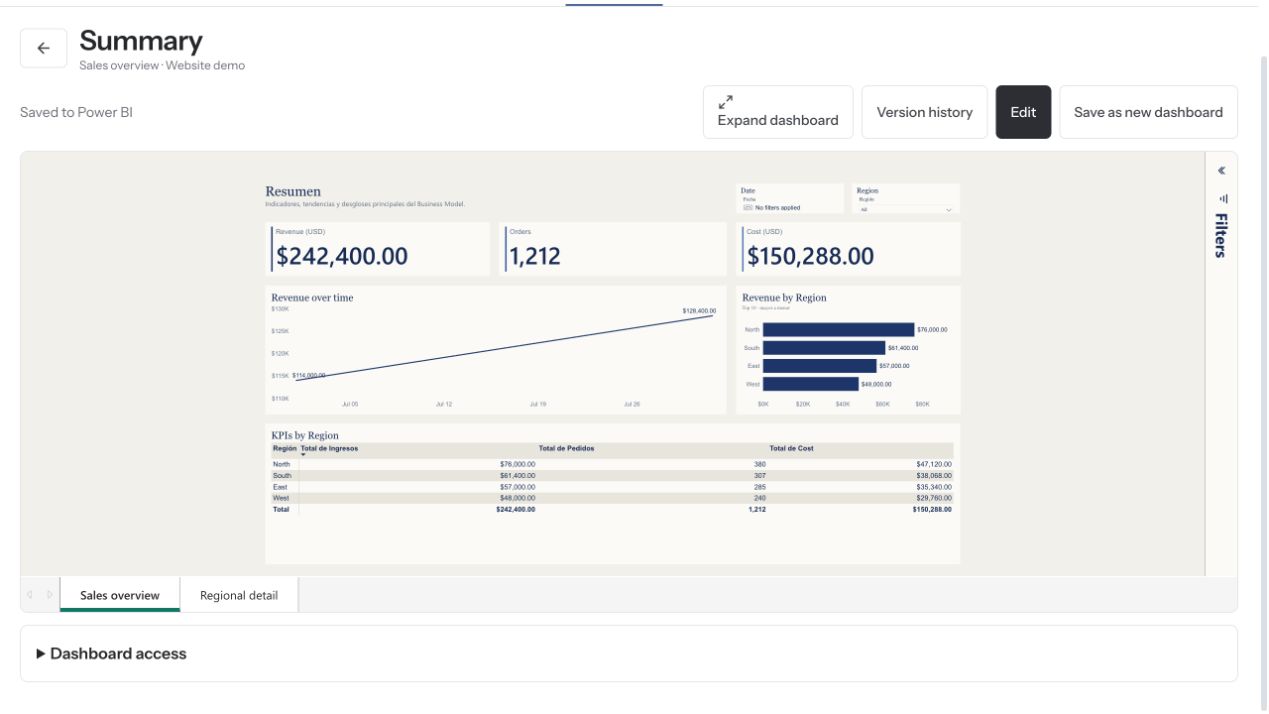
Real Timeliq sales dashboard with synthetic July and August 2026 data

Timeliq product demo · Sample data

Real Timeliq sales dashboard with synthetic July and August 2026 data

Timeliq product demo · Sample data

Editable dashboards

Editable dashboards

Microsoft 365 sign-in

Microsoft 365 sign-in

WhatsApp & Slack

WhatsApp & Slack

From data to daily decisions

Connect it. Build it. Share it. Ask it.

Connect it. Build it. Share it. Ask it.

Bring your data, build the view you need, and make it part of the way your team works.

Bring your data, build the view you need, and make it part of the way your team works.

Start with your data.

Upload Excel or CSV files, or connect an Excel Online workbook through OneDrive. Timeliq prepares a reusable data model for your dashboards and questions.

Excel and CSV uploads

Excel Online connection

A shared model for reporting

Start with your data.

Upload Excel or CSV files, or connect an Excel Online workbook through OneDrive. Timeliq prepares a reusable data model for your dashboards and questions.

Excel and CSV uploads

Excel Online connection

A shared model for reporting

Start with your data.

Upload Excel or CSV files, or connect an Excel Online workbook through OneDrive. Timeliq prepares a reusable data model for your dashboards and questions.

Excel and CSV uploads

Excel Online connection

A shared model for reporting

Build with AI. Edit your way.

Describe the dashboard you need. Then change charts, fields, filters and layouts yourself—or ask AI for the next change. Your report stays editable.

Create from a prompt

Edit visually without writing code

Save and keep improving

Build with AI. Edit your way.

Describe the dashboard you need. Then change charts, fields, filters and layouts yourself—or ask AI for the next change. Your report stays editable.

Create from a prompt

Edit visually without writing code

Save and keep improving

Build with AI. Edit your way.

Describe the dashboard you need. Then change charts, fields, filters and layouts yourself—or ask AI for the next change. Your report stays editable.

Create from a prompt

Edit visually without writing code

Save and keep improving

Give every report a home.

Bring reports together in your portal. Invite colleagues or clients, organize access and help people find the right information without searching through old messages.

One report catalog

Internal and external invitations

Roles and report permissions

Give every report a home.

Bring reports together in your portal. Invite colleagues or clients, organize access and help people find the right information without searching through old messages.

One report catalog

Internal and external invitations

Roles and report permissions

Give every report a home.

Bring reports together in your portal. Invite colleagues or clients, organize access and help people find the right information without searching through old messages.

One report catalog

Internal and external invitations

Roles and report permissions

Ask your numbers. Keep moving.

Ask a business question in Timeliq, WhatsApp or Slack. Explore the metrics in your connected model and follow up when you need another view.

Questions in everyday language

Answers based on your connected model

Web, WhatsApp and Slack

Ask your numbers. Keep moving.

Ask a business question in Timeliq, WhatsApp or Slack. Explore the metrics in your connected model and follow up when you need another view.

Questions in everyday language

Answers based on your connected model

Web, WhatsApp and Slack

Ask your numbers. Keep moving.

Ask a business question in Timeliq, WhatsApp or Slack. Explore the metrics in your connected model and follow up when you need another view.

Questions in everyday language

Answers based on your connected model

Web, WhatsApp and Slack

Built for ongoing reporting

More than a dashboard generated once.

Keep your model, improve your reports and give your team a dependable place to return to.

AI-built. Human-editable.

AI helps you get started. You stay in control of the charts, filters and layout.

AI-built. Human-editable.

AI helps you get started. You stay in control of the charts, filters and layout.

Shared metrics. Clearer conversations.

Use the same data model for dashboards and questions instead of redefining the numbers each time.

Shared metrics. Clearer conversations.

Use the same data model for dashboards and questions instead of redefining the numbers each time.

Reports that stay useful.

Refresh supported connected data or replace an uploaded file and keep working with your reports.

Reports that stay useful.

Refresh supported connected data or replace an uploaded file and keep working with your reports.

Microsoft 365 sign-in.

Let authorized users access Timeliq with their work account.

Microsoft 365 sign-in.

Let authorized users access Timeliq with their work account.

The right access for the right people.

Manage report access and keep company or client workspaces separate.

The right access for the right people.

Manage report access and keep company or client workspaces separate.

One workflow for teams and clients.

Use Timeliq internally or give clients a structured place to use the reporting you deliver.

One workflow for teams and clients.

Use Timeliq internally or give clients a structured place to use the reporting you deliver.

Connect your existing Power BI

Keep what you’ve built. Make it easier to use.

Already have Power BI reports and semantic models? Connect them to Timeliq. Give authorized users a clearer place to find their reports and a new way to ask questions about the data.

Your existing reporting investment. More ways to put it to work.

Connecting an existing Power BI environment requires the appropriate permissions. Administrator approval and Microsoft licensing requirements depend on your setup.

Your reporting portal

Your reports deserve more than a shared link.

Give teams and clients one place to find the reports they need. Organize the catalog, invite users and manage access—all as part of Timeliq.

Illustrative example · Sample data

Portal
Report catalog

Sales overview · Finance summary

Operations · Client reporting

Microsoft 365 sign-in

Invitations, roles and report permissions

Separate client workspaces

Illustrative example · Sample data

Portal is included in every plan. Multiple client workspaces are available in Partner.

Simple plans. Useful BI.

Start small. Bring your whole team along.

Every plan includes editable dashboards, Portal and business-data questions in Timeliq, WhatsApp and Slack. Choose the space and usage your team needs.

Save about 20% with annual billing

Starter

Turn your first reporting workflow into dashboards and answers your team can use.

1 workspace · up to 10 users

1 data model

5 saved reports

100 data questions / month

10 AI report creations or edits / month

$49

/ month

Billed monthly

Business

Recommended

Make shared dashboards and business answers part of your team’s daily routine.

1 workspace · up to 50 users

5 data models

25 saved reports

500 data questions / month

50 AI report creations or edits / month

$149

/ month

Billed monthly

Partner

Give every client a reporting space of their own, without managing separate tools.

5 workspaces · up to 250 users total

25 data models total

100 saved reports total

2,000 data questions / month

200 AI report creations or edits / month

$349

/ month

Billed monthly

Partner allowances are shared across all five workspaces—not multiplied by five.

Included in every plan: Excel and CSV uploads, Excel Online, AI-assisted data modeling, editable dashboards, Portal, Microsoft 365 sign-in, and data chat in Timeliq, WhatsApp and Slack.

Connecting your existing Power BI reports and semantic models is also included. Requirements depend on your environment; any separately required Microsoft licenses are not included.

Prices are in USD, before applicable taxes. Custom data preparation and implementation services are quoted separately.

Save about 20% with annual billing

Starter

Turn your first reporting workflow into dashboards and answers your team can use.

1 workspace · up to 10 users

1 data model

5 saved reports

100 data questions / month

10 AI report creations or edits / month

$49

/ month

Billed monthly

Business

Recommended

Make shared dashboards and business answers part of your team’s daily routine.

1 workspace · up to 50 users

5 data models

25 saved reports

500 data questions / month

50 AI report creations or edits / month

$149

/ month

Billed monthly

Partner

Give every client a reporting space of their own, without managing separate tools.

5 workspaces · up to 250 users total

25 data models total

100 saved reports total

2,000 data questions / month

200 AI report creations or edits / month

$349

/ month

Billed monthly

Partner allowances are shared across all five workspaces—not multiplied by five.

Included in every plan: Excel and CSV uploads, Excel Online, AI-assisted data modeling, editable dashboards, Portal, Microsoft 365 sign-in, and data chat in Timeliq, WhatsApp and Slack.

Connecting your existing Power BI reports and semantic models is also included. Requirements depend on your environment; any separately required Microsoft licenses are not included.

Prices are in USD, before applicable taxes. Custom data preparation and implementation services are quoted separately.

Save about 20% with annual billing

Starter

Turn your first reporting workflow into dashboards and answers your team can use.

1 workspace · up to 10 users

1 data model

5 saved reports

100 data questions / month

10 AI report creations or edits / month

$49

/ month

Billed monthly

Business

Recommended

Make shared dashboards and business answers part of your team’s daily routine.

1 workspace · up to 50 users

5 data models

25 saved reports

500 data questions / month

50 AI report creations or edits / month

$149

/ month

Billed monthly

Partner

Give every client a reporting space of their own, without managing separate tools.

5 workspaces · up to 250 users total

25 data models total

100 saved reports total

2,000 data questions / month

200 AI report creations or edits / month

$349

/ month

Billed monthly

Partner allowances are shared across all five workspaces—not multiplied by five.

Included in every plan: Excel and CSV uploads, Excel Online, AI-assisted data modeling, editable dashboards, Portal, Microsoft 365 sign-in, and data chat in Timeliq, WhatsApp and Slack.

Connecting your existing Power BI reports and semantic models is also included. Requirements depend on your environment; any separately required Microsoft licenses are not included.

Prices are in USD, before applicable taxes. Custom data preparation and implementation services are quoted separately.

Questions before you get started.

Questions before you get started.

How Timeliq fits your data, your reports and the people who use them.

How Timeliq fits your data, your reports and the people who use them.

What is Timeliq?

Timeliq is a business intelligence platform for turning supported data into editable dashboards, sharing reports through a secure portal, and asking questions about your business data in the web app, WhatsApp or Slack.

Do I need technical experience?

You can start with a supported spreadsheet and use the guided workflow and AI to create a report. You can then edit it visually. Complex source structures or business rules may need additional preparation.

Can I edit an AI-generated dashboard?

Yes. Change charts, fields, filters and layout in the visual editor, then save your work. You can also ask AI for changes. Manual visual edits do not consume your AI report-action allowance.

Is Portal a separate product?

No. Portal is part of Timeliq and is included in every plan. It gives authorized users a place to find reports and helps you manage access. Partner includes five separate workspaces for client reporting.

Can I connect my existing Power BI?

Yes. Connect your organization’s existing Power BI reports and semantic models. The connection requires the right permissions and may require administrator approval. Microsoft licensing requirements depend on the external environment and connection setup.

Can I ask questions in WhatsApp and Slack?

Yes. Authorized users can ask questions about their connected models in Timeliq, WhatsApp and Slack. These channels use the shared data-question allowance and are intended for BI questions, not general-purpose automatic replies.

How is access managed?

Use invitations, roles and report permissions to decide who can use each workspace and report. Microsoft 365 sign-in identifies the user; it does not automatically grant access to all data. Connected channels and external sources also need the appropriate authorization.

Turn your next business question into a better decision.

Build a dashboard you can change, give it a secure home, and make the answers easier to reach.

Bring your reporting challenge. We’ll help you explore the right setup.

Turn your next business question into a better decision.

Build a dashboard you can change, give it a secure home, and make the answers easier to reach.

Bring your reporting challenge. We’ll help you explore the right setup.

Turn your next business question into a better decision.

Build a dashboard you can change, give it a secure home, and make the answers easier to reach.

Bring your reporting challenge. We’ll help you explore the right setup.